Skip to content
Pay with mobile money · money held until your goods arrive Sell on MarketPort How it works Careers Order on WhatsApp
Wholesale delivered to your district EN
Pay with mobile money · money held until your goods arrive 🏪 Shop owners & suppliers: open your FREE MarketPort account today! Sell to traders all over Uganda — no fees to join. Join now 👉 SHOP NOW

‹ All guides

Sellers

How to add a product with photos

Good photos and clear bulk prices bring more orders. You can add products from your phone.

  1. 1

    Open your shop dashboard, go to Products and tap Add product.
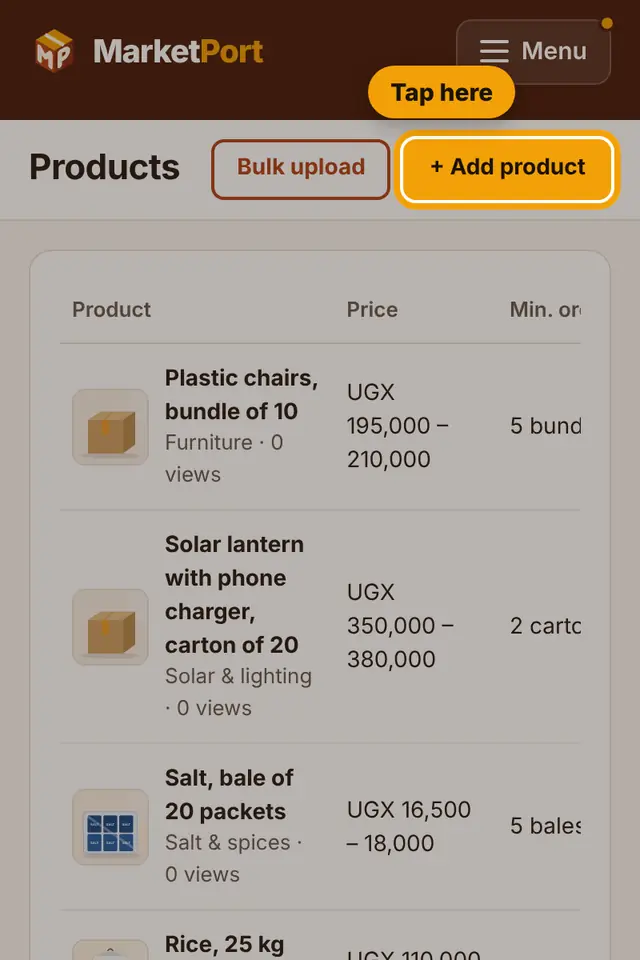
    Step 1: Open your shop dashboard, go to Products and tap Add product.
  2. 2

    Type the product name, for example "Sugar 50 kg bag", and choose the category.

    Step 2: Type the product name, for example "Sugar 50 kg bag", and choose the category.
  3. 3

    Write what you sell it by (bag, carton, piece), the minimum order and how many you have in stock.

    Step 3: Write what you sell it by (bag, carton, piece), the minimum order and how many you have in stock.
  4. 4

    Type your price. You can add a lower price for bigger quantities.

    Step 4: Type your price. You can add a lower price for bigger quantities.
  5. 5

    Scroll to Photos and tap "Choose files". Take new photos or pick them from your gallery. You can choose several at once.

    Step 5: Scroll to Photos and tap "Choose files". Take new photos or pick them from your gallery. You can choose several at once.
  6. 6

    Tap Save product. Your product appears in your shop and in search.

    Step 6: Tap Save product. Your product appears in your shop and in search.
Tip: Put the product on a plain background, use daylight, and fill most of the photo with the product. MarketPort cleans and squares the photo for you.

Still stuck?

Call or WhatsApp MarketPort and we will help you, or visit a MarketPort agent.