

 SHOP NOW
Buyers
How to create your account
It is free and takes about 2 minutes. You need your phone number and an email address.
-
1
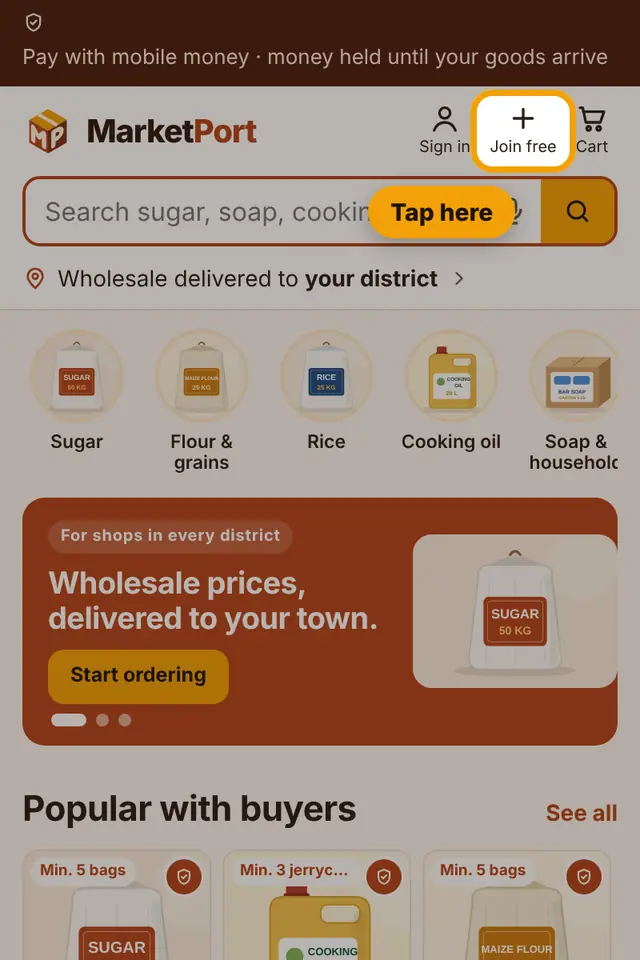
Open marketport.store and tap Join free at the top.
-
2
Type your name (or your shop name) and your phone number. You will sign in with this number.

-
3
Choose your district and type your town or trading centre. This helps sellers deliver to you.

-
4
Type your email and choose a password of at least 8 characters. Write the password down somewhere safe.

-
5
Tick "I agree", then tap Create account.

-
6
We send a 6-digit code to your email. Open your email (check Spam too), type the code here and tap Confirm email.

-
7
Done! Your account is ready. Search for what you need and start ordering.

Tip: Have a Google (Gmail) account? Tap "Sign up with Google" at the top of the form: your name and email fill in by themselves and there is no code to type.
Still stuck?
Call or WhatsApp MarketPort and we will help you, or visit a MarketPort agent.