

 SHOP NOW
How to open your shop and sell
Register your business, confirm your email, then send your ID and shop photos. MarketPort checks them, usually within a day.
-
1
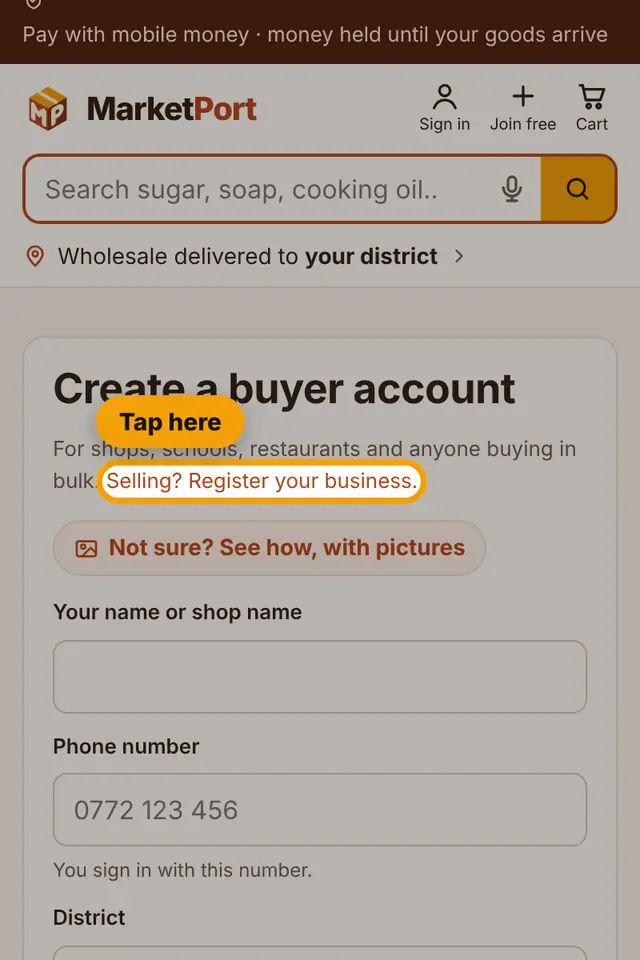
On the sign-up page, tap "Selling? Register your business."
-
2
Choose your plan and what kind of seller you are, then type your business name and what you sell.

-
3
Fill in your name, phone, district, email and password, tick "I agree" and tap Register my business. Then confirm your email with the code we send.

-
4
Next, verify your business: choose your ID type, and type your ID number and full name exactly as on the ID.

-
5
Add the photos: the front and back of your ID, a selfie, and a photo of your shop. Tap each "Choose file" button to take or pick the photo. Use daylight so everything is clear.

-
6
Tap Submit for verification. We check your documents and tell you when your shop is approved.

Still stuck?
Call or WhatsApp MarketPort and we will help you, or visit a MarketPort agent.